# 出处
文章链接 http://blog.didispace.com/spring-security-oauth2-xjf-1/ (opens new window)
源码链接 https://github.com/lexburner/oauth2-demo (opens new window)
# 概述
使用 oauth2 保护你的应用,可以分为简易的分为三个步骤
- 配置资源服务器
- 配置认证服务器
- 配置 spring security
前两点是 oauth2 的主体内容,spring security oauth2 是建立在 spring security 基础之上的,所以有一些体系是公用的。
oauth2 根据使用场景不同,分成了 4 种模式
- 授权码模式(authorization code)
- 简化模式(implicit)
- 密码模式(resource owner password credentials)
- 客户端模式(client credentials)
本文重点讲解接口对接中常使用的密码模式(以下简称 password 模式)和客户端模式(以下简称 client 模式)。授权码模式使用到了回调地址,是最为复杂的方式,通常网站中经常出现的微博,qq 第三方登录,都会采用这个形式。简化模式不常用。
# 项目准备
主要的 maven 依赖如下
<!-- 注意是starter,自动配置 -->
<dependency>
    <groupId>org.springframework.boot</groupId>
    <artifactId>spring-boot-starter-security</artifactId>
</dependency>
<!-- 不是starter,手动配置 -->
<dependency>
    <groupId>org.springframework.security.oauth</groupId>
    <artifactId>spring-security-oauth2</artifactId>
</dependency>
<dependency>
    <groupId>org.springframework.boot</groupId>
    <artifactId>spring-boot-starter-web</artifactId>
</dependency>
<!-- 将token存储在redis中 -->
<dependency>
    <groupId>org.springframework.boot</groupId>
    <artifactId>spring-boot-starter-data-redis</artifactId>
</dependency>
我们给自己先定个目标,要干什么事?既然说到保护应用,那必须得先有一些资源,我们创建一个 endpoint 作为提供给外部的接口:
@RestController
public class TestEndpoints {

    @GetMapping("/product/{id}")
    public String getProduct(@PathVariable String id) {
        //for debug
        Authentication authentication = SecurityContextHolder.getContext().getAuthentication();
        return "product id : " + id;
    }

    @GetMapping("/order/{id}")
    public String getOrder(@PathVariable String id) {
        //for debug
        Authentication authentication = SecurityContextHolder.getContext().getAuthentication();
        return "order id : " + id;
    }

}
暴露一个商品查询接口,后续不做安全限制,一个订单查询接口,后续添加访问控制。
# 配置资源服务器和授权服务器
由于是两个 oauth2 的核心配置,我们放到一个配置类中。 为了方便下载代码直接运行,我这里将客户端信息放到了内存中,生产中可以配置到数据库中。token 的存储一般选择使用 Redis,一是性能比较好,二是自动过期的机制,符合 token 的特性。
@Configuration
public class OAuth2ServerConfig {

    private static final String DEMO_RESOURCE_ID = "order";

    @Configuration
    @EnableResourceServer
    protected static class ResourceServerConfiguration extends ResourceServerConfigurerAdapter {

        @Override
        public void configure(ResourceServerSecurityConfigurer resources) {
            resources.resourceId(DEMO_RESOURCE_ID).stateless(true);
        }

        @Override
        public void configure(HttpSecurity http) throws Exception {
            // @formatter:off
            http
                    // Since we want the protected resources to be accessible in the UI as well we need
                    // session creation to be allowed (it's disabled by default in 2.0.6)
                    .sessionManagement().sessionCreationPolicy(SessionCreationPolicy.IF_REQUIRED)
                    .and()
                    .requestMatchers().anyRequest()
                    .and()
                    .anonymous()
                    .and()
                    .authorizeRequests()
//                    .antMatchers("/product/**").access("#oauth2.hasScope('select') and hasRole('ROLE_USER')")
                    .antMatchers("/order/**").authenticated();//配置order访问控制,必须认证过后才可以访问
            // @formatter:on
        }
    }


    @Configuration
    @EnableAuthorizationServer
    protected static class AuthorizationServerConfiguration extends AuthorizationServerConfigurerAdapter {

        @Autowired
        AuthenticationManager authenticationManager;
        @Autowired
        RedisConnectionFactory redisConnectionFactory;

        @Override
        public void configure(ClientDetailsServiceConfigurer clients) throws Exception {
            //配置两个客户端,一个用于password认证一个用于client认证
            clients.inMemory().withClient("client_1")
                    .resourceIds(DEMO_RESOURCE_ID)
                    .authorizedGrantTypes("client_credentials", "refresh_token")
                    .scopes("select")
                    .authorities("client")
                    .secret("123456")
                    .and().withClient("client_2")
                    .resourceIds(DEMO_RESOURCE_ID)
                    .authorizedGrantTypes("password", "refresh_token")
                    .scopes("select")
                    .authorities("client")
                    .secret("123456");
        }

        @Override
        public void configure(AuthorizationServerEndpointsConfigurer endpoints) throws Exception {
            endpoints
                    .tokenStore(new RedisTokenStore(redisConnectionFactory))
                    .authenticationManager(authenticationManager);
        }

        @Override
        public void configure(AuthorizationServerSecurityConfigurer oauthServer) throws Exception {
            //允许表单认证
            oauthServer.allowFormAuthenticationForClients();
        }

    }

}
简单说下 spring security oauth2 的认证思路。
- client 模式,没有用户的概念,直接与认证服务器交互,用配置中的客户端信息去申请 accessToken,客户端有自己的 client_id,client_secret 对应于用户的 username,password,而客户端也拥有自己的 authorities,当采取 client 模式认证时,对应的权限也就是客户端自己的 authorities。
- password 模式,自己本身有一套用户体系,在认证时需要带上自己的用户名和密码,以及客户端的 client_id,client_secret。此时,accessToken 所包含的权限是用户本身的权限,而不是客户端的权限。
我对于两种模式的理解便是,如果你的系统已经有了一套用户体系,每个用户也有了一定的权限,可以采用 password 模式;如果仅仅是接口的对接,不考虑用户,则可以使用 client 模式。
# 配置 spring security
在 spring security 的版本迭代中,产生了多种配置方式,建造者模式,适配器模式等等设计模式的使用,spring security 内部的认证 flow 也是错综复杂,在我一开始学习 ss 也产生了不少困惑,总结了一下配置经验:使用了 springboot 之后,spring security 其实是有不少自动配置的,我们可以仅仅修改自己需要的那一部分,并且遵循一个原则,直接覆盖最需要的那一部分。这一说法比较抽象,举个例子。比如配置内存中的用户认证器。有两种配置方式
planA:
@Bean
protected UserDetailsService userDetailsService(){
    InMemoryUserDetailsManager manager = new InMemoryUserDetailsManager();
    manager.createUser(User.withUsername("user_1").password("123456").authorities("USER").build());
    manager.createUser(User.withUsername("user_2").password("123456").authorities("USER").build());
    return manager;
}
planB:
@Configuration
@EnableWebSecurity
public class SecurityConfiguration extends WebSecurityConfigurerAdapter {

    @Override
    protected void configure(AuthenticationManagerBuilder auth) throws Exception {
        auth.inMemoryAuthentication()
                .withUser("user_1").password("123456").authorities("USER")
                .and()
                .withUser("user_2").password("123456").authorities("USER");
   }

   @Bean
   @Override
   public AuthenticationManager authenticationManagerBean() throws Exception {
       AuthenticationManager manager = super.authenticationManagerBean();
        return manager;
    }
}
你最终都能得到配置在内存中的两个用户,前者是直接替换掉了容器中的 UserDetailsService,这么做比较直观;后者是替换了 AuthenticationManager,当然你还会在 SecurityConfiguration 复写其他配置,这么配置最终会由一个委托者去认证。如果你熟悉 spring security,会知道 AuthenticationManager 和 AuthenticationProvider 以及 UserDetailsService 的关系,他们都是顶级的接口,实现类之间错综复杂的聚合关系…配置方式千差万别,但理解清楚认证流程,知道各个实现类对应的职责才是掌握 spring security 的关键。
下面给出我最终的配置:
@Configuration
@EnableWebSecurity
public class SecurityConfiguration extends WebSecurityConfigurerAdapter {

    @Bean
    @Override
    protected UserDetailsService userDetailsService(){
        InMemoryUserDetailsManager manager = new InMemoryUserDetailsManager();
        manager.createUser(User.withUsername("user_1").password("123456").authorities("USER").build());
        manager.createUser(User.withUsername("user_2").password("123456").authorities("USER").build());
        return manager;
    }

    @Override
    protected void configure(HttpSecurity http) throws Exception {
        // @formatter:off
        http
            .requestMatchers().anyRequest()
            .and()
                .authorizeRequests()
                .antMatchers("/oauth/*").permitAll();
        // @formatter:on
    }
}
重点就是配置了一个 UserDetailsService,和 ClientDetailsService 一样,为了方便运行,使用内存中的用户,实际项目中,一般使用的是数据库保存用户,具体的实现类可以使用 JdbcDaoImpl 或者 JdbcUserDetailsManager。
# 获取 token
进行如上配置之后,启动 springboot 应用就可以发现多了一些自动创建的 endpoints:
{[/oauth/authorize]}
{[/oauth/authorize],methods=[POST]
{[/oauth/token],methods=[GET]}
{[/oauth/token],methods=[POST]}
{[/oauth/check_token]}
{[/oauth/error]}
重点关注一下/oauth/token,它是获取的 token 的 endpoint。启动 springboot 应用之后,使用 http 工具访问 :
- password 模式:
http://localhost:8080/oauth/token? username=user_1&password=123456& grant_type=password&scope=select& client_id=client_2&client_secret=123456,响应如下:
{
  "access_token": "950a7cc9-5a8a-42c9-a693-40e817b1a4b0",
  "token_type": "bearer",
  "refresh_token": "773a0fcd-6023-45f8-8848-e141296cb3cb",
  "expires_in": 27036,
  "scope": "select"
}
- client 模式:
http://localhost:8080/oauth/token? grant_type=client_credentials& scope=select& client_id=client_1& client_secret=123456,响应如下:
{
  "access_token": "56465b41-429d-436c-ad8d-613d476ff322",
  "token_type": "bearer",
  "expires_in": 25074,
  "scope": "select"
}
在配置中,我们已经配置了对 order 资源的保护,如果直接访问: http://localhost:8080/order/1 ,会得到这样的响应:
{
  "error": "unauthorized",
  "error_description": "Full authentication is required to access this resource"
}
(这样的错误响应可以通过重写配置来修改)
而对于未受保护的 product 资源
http://localhost:8080/product/1
则可以直接访问,得到响应
product id : 1
# 携带 accessToken 参数访问受保护的资源
使用 password 模式获得的 token:
http://localhost:8080/order/1?access_token=950a7cc9-5a8a-42c9-a693-40e817b1a4b0
得到了之前匿名访问无法获取的资源:
order id : 1
使用 client 模式获得的 token:
http://localhost:8080/order/1?access_token=56465b41-429d-436c-ad8d-613d476ff322
同上的响应
order id : 1
我们重点关注一下 debug 后,对资源访问时系统记录的用户认证信息,可以看到如下的 debug 信息
password 模式:
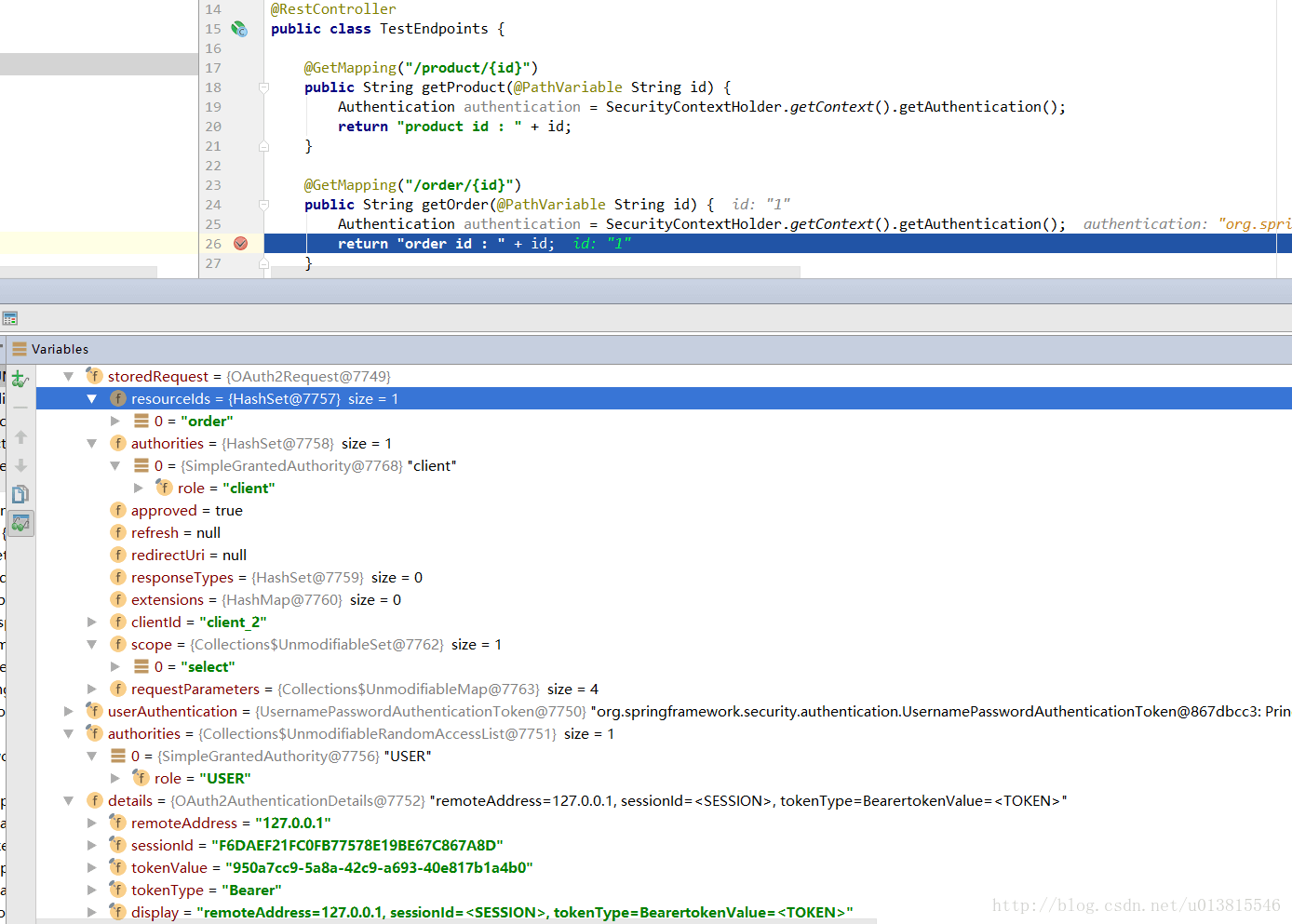 (opens new window)password 模式
client 模式:
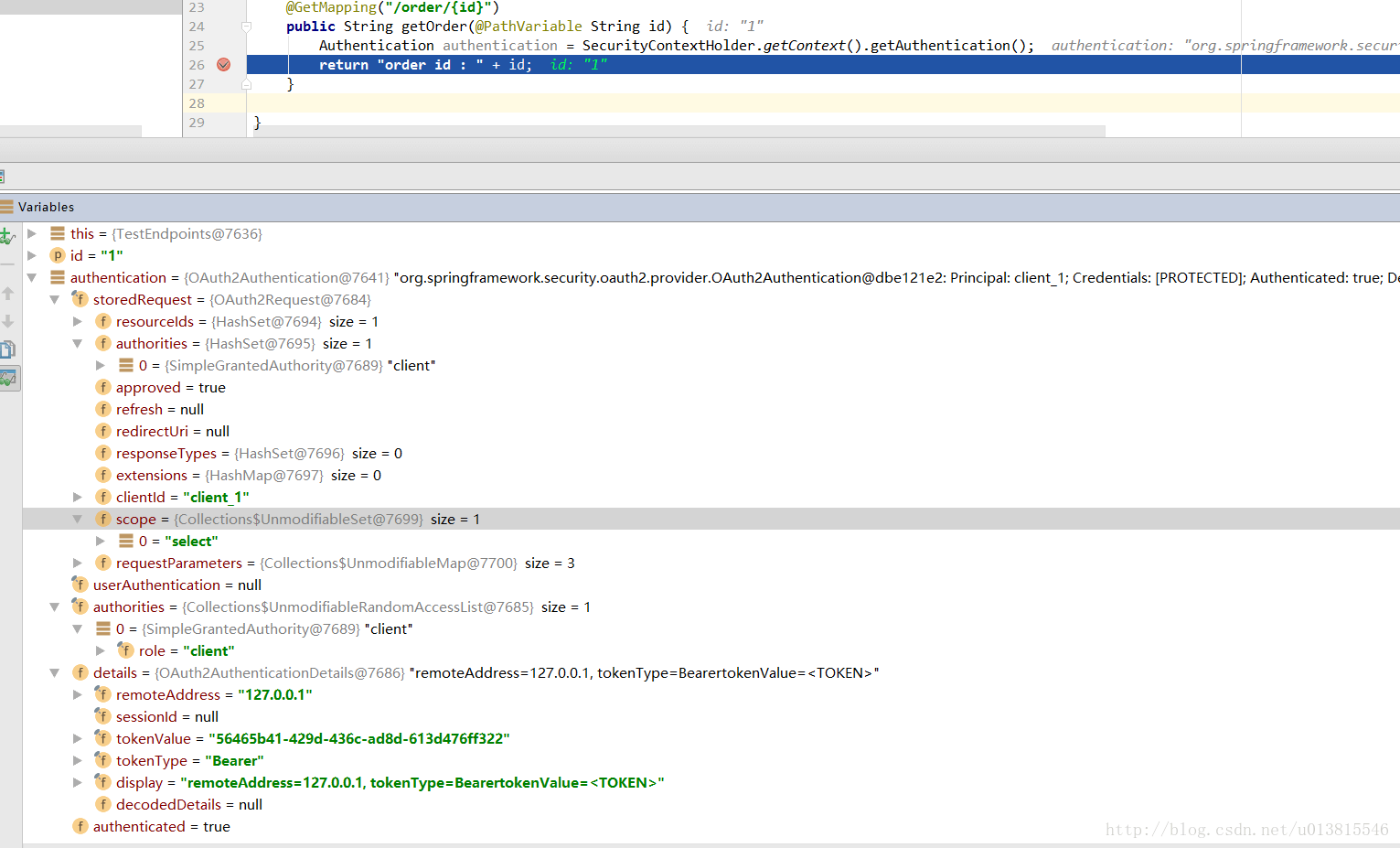 (opens new window)client 模式
和我们的配置是一致的,仔细看可以发现两者的身份有些许的不同。想要查看更多的 debug 信息,可以选择下载 demo 代码自己查看,为了方便读者调试和验证,我去除了很多复杂的特性,基本实现了一个最简配置,涉及到数据库的地方也尽量配置到了内存中,这点记住在实际使用时一定要修改。
到这儿,一个简单的 oauth2 入门示例就完成了,一个简单的配置教程。token 的工作原理是什么,它包含了哪些信息?spring 内部如何对身份信息进行验证?以及上述的配置到底影响了什么?这些内容会放到后面的文章中去分析。
# 获取 token 分析
上一篇博客中我们尝试使用了 password 模式和 client 模式,有一个比较关键的 endpoint:/oauth/token。从这个入口开始分析,spring security oauth2 内部是如何生成 token 的。
首先开启 debug 信息:
logging:
  level:
    org.springframework: DEBUG
可以完整的看到内部的运转流程。
client 模式稍微简单一些,使用 client 模式获取 token
http://localhost:8080/oauth/token? client_id=client_1&client_secret=123456&scope=select&grant_type=client_credentials
由于 debug 信息太多了,我简单按照顺序列了一下关键的几个类:
ClientCredentialsTokenEndpointFilter
DaoAuthenticationProvider
TokenEndpoint
TokenGranter
# ClientCredentialsTokenEndpointFilter 和 DaoAuthenticationProvider
截取关键的代码,可以分析出大概的流程 在请求到达/oauth/token 之前经过了 ClientCredentialsTokenEndpointFilter 这个过滤器,关键方法如下
public Authentication attemptAuthentication(HttpServletRequest request, HttpServletResponse response)
        throws AuthenticationException, IOException, ServletException {
    ...
    String clientId = request.getParameter("client_id");
    String clientSecret = request.getParameter("client_secret");

    ...
    clientId = clientId.trim();
    UsernamePasswordAuthenticationToken authRequest = new UsernamePasswordAuthenticationToken(clientId,
            clientSecret);

    return this.getAuthenticationManager().authenticate(authRequest);

}
用来从请求中获取 client_id,client_secret,组装成一个 UsernamePasswordAuthenticationToken 作为身份标识,使用容器中的顶级身份管理器 AuthenticationManager 去进行身份认证(AuthenticationManager 的实现类一般是 ProviderManager。而 ProviderManager 内部维护了一个 List,真正的身份认证是由一系列 AuthenticationProvider 去完成。而 AuthenticationProvider 的常用实现类则是 DaoAuthenticationProvider,DaoAuthenticationProvider 内部又聚合了一个 UserDetailsService 接口,UserDetailsService 才是获取用户详细信息的最终接口,而我们上一篇文章中在内存中配置用户,就是使用了 UserDetailsService 的一个实现类 InMemoryUserDetailsManager)。UML 类图可以大概理解下这些类的关系,省略了授权部分。
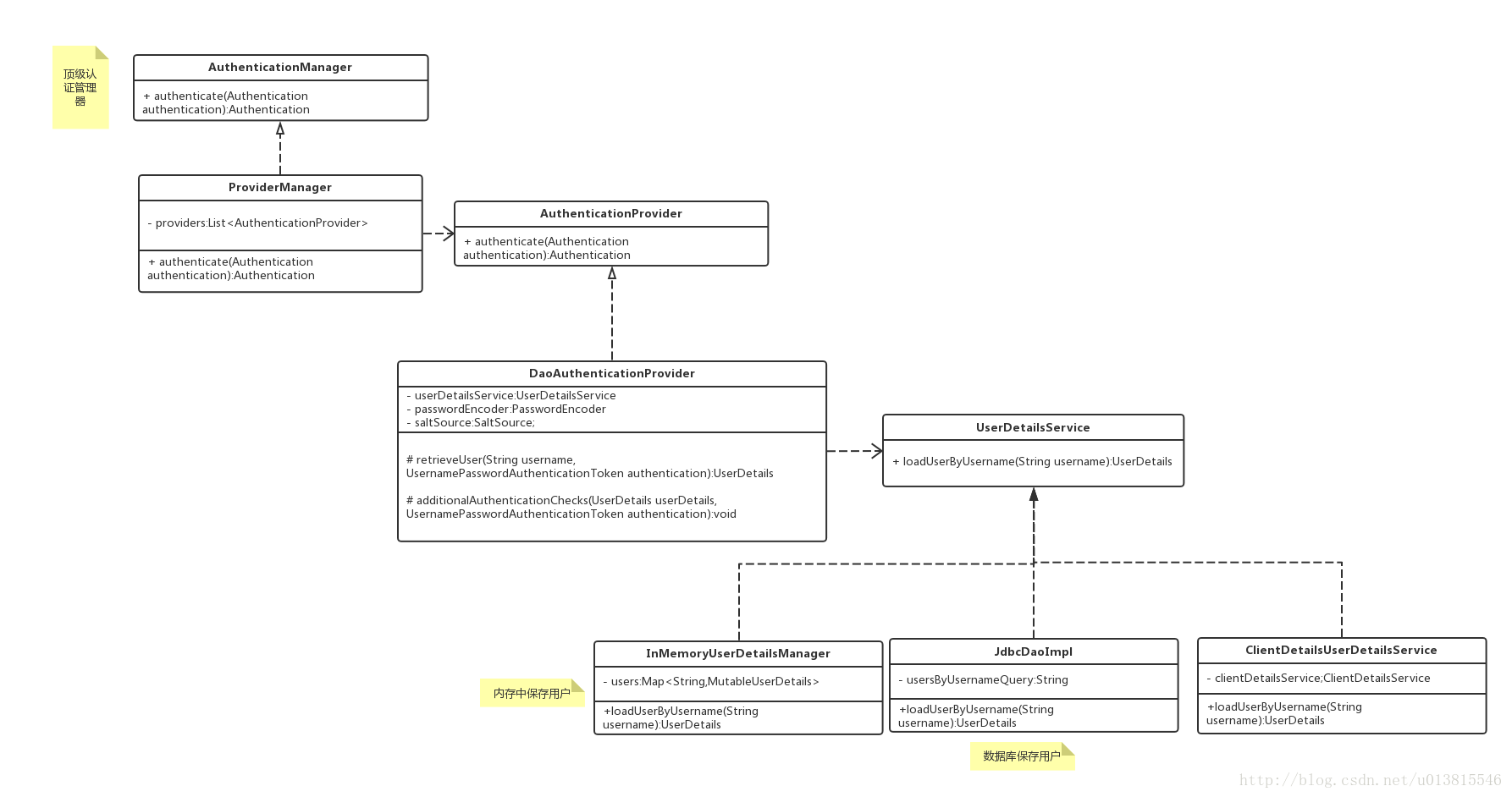 (opens new window)图 1 认证相关 UML 类图
可能机智的读者会发现一个问题,我前面一片文章已经提到了 client 模式是不存在“用户”的概念的,那么这里的身份认证是在认证什么呢?debug 可以发现 UserDetailsService 的实现被适配成了 ClientDetailsUserDetailsService,这个设计是将 client 客户端的信息(client_id,client_secret)适配成用户的信息(username,password),这样我们的认证流程就不需要修改了。
经过 ClientCredentialsTokenEndpointFilter 之后,身份信息已经得到了 AuthenticationManager 的验证。接着便到达了 TokenEndpoint。
# TokenEndpoint
前面的两个 ClientCredentialsTokenEndpointFilter 和 DaoAuthenticationProvider 可以理解为一些前置校验,和身份封装,而这个类一看名字就知道和我们的 token 是密切相关的。
@FrameworkEndpoint
public class TokenEndpoint extends AbstractEndpoint {

    @RequestMapping(value = "/oauth/token", method=RequestMethod.POST)
    public ResponseEntity<OAuth2AccessToken> postAccessToken(Principal principal, @RequestParam
    Map<String, String> parameters) throws HttpRequestMethodNotSupportedException {
         ...
        String clientId = getClientId(principal);
        ClientDetails authenticatedClient = getClientDetailsService().loadClientByClientId(clientId);
        ...
        TokenRequest tokenRequest = getOAuth2RequestFactory().createTokenRequest(parameters, authenticatedClient);
        ...
        OAuth2AccessToken token = getTokenGranter().grant(tokenRequest.getGrantType(), tokenRequest);
        ...
        return getResponse(token);

    }

    private TokenGranter tokenGranter;

 }
省略了一些校验代码之后,真正的/oauth/token 端点暴露在了我们眼前,其中方法参数中的 Principal 经过之前的过滤器,已经被填充了相关的信息,而方法的内部则是依赖了一个 TokenGranter 来颁发 token。其中 OAuth2AccessToken 的实现类 DefaultOAuth2AccessToken 就是最终在控制台得到的 token 序列化之前的原始类:
public class DefaultOAuth2AccessToken implements Serializable, OAuth2AccessToken {

    private static final long serialVersionUID = 914967629530462926L;

    private String value;

    private Date expiration;

    private String tokenType = BEARER_TYPE.toLowerCase();

    private OAuth2RefreshToken refreshToken;

    private Set<String> scope;

    private Map<String, Object> additionalInformation = Collections.emptyMap();

    //getter,setter
}


@org.codehaus.jackson.map.annotate.JsonSerialize(using = OAuth2AccessTokenJackson1Serializer.class)
@org.codehaus.jackson.map.annotate.JsonDeserialize(using = OAuth2AccessTokenJackson1Deserializer.class)
@com.fasterxml.jackson.databind.annotation.JsonSerialize(using = OAuth2AccessTokenJackson2Serializer.class)
@com.fasterxml.jackson.databind.annotation.JsonDeserialize(using = OAuth2AccessTokenJackson2Deserializer.class)

public interface OAuth2AccessToken {

    public static String BEARER_TYPE = "Bearer";

    public static String OAUTH2_TYPE = "OAuth2";

    /**
     * The access token issued by the authorization server. This value is REQUIRED.
     */
    public static String ACCESS_TOKEN = "access_token";

    /**
     * The type of the token issued as described in <a
     * href="http://tools.ietf.org/html/draft-ietf-oauth-v2-22#section-7.1">Section 7.1</a>. Value is case insensitive.
     * This value is REQUIRED.
     */
    public static String TOKEN_TYPE = "token_type";

    /**
     * The lifetime in seconds of the access token. For example, the value "3600" denotes that the access token will
     * expire in one hour from the time the response was generated. This value is OPTIONAL.
     */
    public static String EXPIRES_IN = "expires_in";

    /**
     * The refresh token which can be used to obtain new access tokens using the same authorization grant as described
     * in <a href="http://tools.ietf.org/html/draft-ietf-oauth-v2-22#section-6">Section 6</a>. This value is OPTIONAL.
     */
    public static String REFRESH_TOKEN = "refresh_token";

    /**
     * The scope of the access token as described by <a
     * href="http://tools.ietf.org/html/draft-ietf-oauth-v2-22#section-3.3">Section 3.3</a>
     */
    public static String SCOPE = "scope";

    ...
}
一个典型的样例 token 响应,如下所示,就是上述类序列化后的结果:
{
  "access_token": "950a7cc9-5a8a-42c9-a693-40e817b1a4b0",
  "token_type": "bearer",
  "refresh_token": "773a0fcd-6023-45f8-8848-e141296cb3cb",
  "expires_in": 27036,
  "scope": "select"
}
# TokenGranter
先从 UML 类图对 TokenGranter 接口的设计有一个宏观的认识
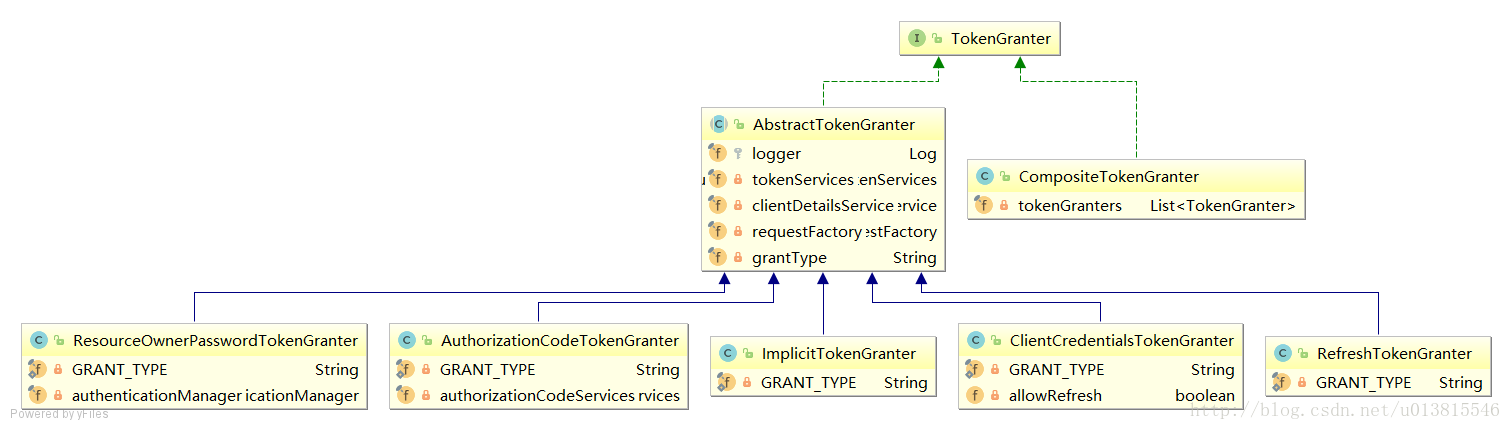 (opens new window)图 2 TokenGranter 相关 UML 类图
TokenGranter 的设计思路是使用 CompositeTokenGranter 管理一个 List 列表,每一种 grantType 对应一个具体的真正授权者,在 debug 过程中可以发现 CompositeTokenGranter 内部就是在循环调用五种 TokenGranter 实现类的 grant 方法,而 granter 内部则是通过 grantType 来区分是否是各自的授权类型。
public class CompositeTokenGranter implements TokenGranter {

    private final List<TokenGranter> tokenGranters;

    public CompositeTokenGranter(List<TokenGranter> tokenGranters) {
        this.tokenGranters = new ArrayList<TokenGranter>(tokenGranters);
    }

    public OAuth2AccessToken grant(String grantType, TokenRequest tokenRequest) {
        for (TokenGranter granter : tokenGranters) {
            OAuth2AccessToken grant = granter.grant(grantType, tokenRequest);
            if (grant!=null) {
                return grant;
            }
        }
        return null;
    }
}
五种类型分别是:
- ResourceOwnerPasswordTokenGranter ==> password 密码模式
- AuthorizationCodeTokenGranter ==> authorization_code 授权码模式
- ClientCredentialsTokenGranter ==> client_credentials 客户端模式
- ImplicitTokenGranter ==> implicit 简化模式
- RefreshTokenGranter ==>refresh_token 刷新 token 专用
以客户端模式为例,思考如何产生 token 的,则需要继续研究 5 种授权者的抽象类:AbstractTokenGranter
public abstract class AbstractTokenGranter implements TokenGranter {

    protected final Log logger = LogFactory.getLog(getClass());

    //与token相关的service,重点
    private final AuthorizationServerTokenServices tokenServices;
    //与clientDetails相关的service,重点
    private final ClientDetailsService clientDetailsService;
    //创建oauth2Request的工厂,重点
    private final OAuth2RequestFactory requestFactory;

    private final String grantType;
    ...

    public OAuth2AccessToken grant(String grantType, TokenRequest tokenRequest) {

        ...
        String clientId = tokenRequest.getClientId();
        ClientDetails client = clientDetailsService.loadClientByClientId(clientId);
        validateGrantType(grantType, client);

        logger.debug("Getting access token for: " + clientId);

        return getAccessToken(client, tokenRequest);

    }

    protected OAuth2AccessToken getAccessToken(ClientDetails client, TokenRequest tokenRequest) {
        return tokenServices.createAccessToken(getOAuth2Authentication(client, tokenRequest));
    }

    protected OAuth2Authentication getOAuth2Authentication(ClientDetails client, TokenRequest tokenRequest) {
        OAuth2Request storedOAuth2Request = requestFactory.createOAuth2Request(client, tokenRequest);
        return new OAuth2Authentication(storedOAuth2Request, null);
    }

    ...
}
回过头去看 TokenEndpoint 中,正是调用了这里的三个重要的类变量的相关方法。由于篇幅限制,不能延展太多,不然没完没了,所以重点分析下 AuthorizationServerTokenServices 是何方神圣。
# AuthorizationServerTokenServices
public interface AuthorizationServerTokenServices {
    //创建token
    OAuth2AccessToken createAccessToken(OAuth2Authentication authentication) throws AuthenticationException;
    //刷新token
    OAuth2AccessToken refreshAccessToken(String refreshToken, TokenRequest tokenRequest)
            throws AuthenticationException;
    //获取token
    OAuth2AccessToken getAccessToken(OAuth2Authentication authentication);

}
在默认的实现类 DefaultTokenServices 中,可以看到 token 是如何产生的,并且了解了框架对 token 进行哪些信息的关联。
@Transactional
public OAuth2AccessToken createAccessToken(OAuth2Authentication authentication) throws AuthenticationException {

    OAuth2AccessToken existingAccessToken = tokenStore.getAccessToken(authentication);
    OAuth2RefreshToken refreshToken = null;
    if (existingAccessToken != null) {
        if (existingAccessToken.isExpired()) {
            if (existingAccessToken.getRefreshToken() != null) {
                refreshToken = existingAccessToken.getRefreshToken();
                // The token store could remove the refresh token when the
                // access token is removed, but we want to
                // be sure...
                tokenStore.removeRefreshToken(refreshToken);
            }
            tokenStore.removeAccessToken(existingAccessToken);
        }
        else {
            // Re-store the access token in case the authentication has changed
            tokenStore.storeAccessToken(existingAccessToken, authentication);
            return existingAccessToken;
        }
    }

    // Only create a new refresh token if there wasn't an existing one
    // associated with an expired access token.
    // Clients might be holding existing refresh tokens, so we re-use it in
    // the case that the old access token
    // expired.
    if (refreshToken == null) {
        refreshToken = createRefreshToken(authentication);
    }
    // But the refresh token itself might need to be re-issued if it has
    // expired.
    else if (refreshToken instanceof ExpiringOAuth2RefreshToken) {
        ExpiringOAuth2RefreshToken expiring = (ExpiringOAuth2RefreshToken) refreshToken;
        if (System.currentTimeMillis() > expiring.getExpiration().getTime()) {
            refreshToken = createRefreshToken(authentication);
        }
    }

    OAuth2AccessToken accessToken = createAccessToken(authentication, refreshToken);
    tokenStore.storeAccessToken(accessToken, authentication);
    // In case it was modified
    refreshToken = accessToken.getRefreshToken();
    if (refreshToken != null) {
        tokenStore.storeRefreshToken(refreshToken, authentication);
    }
    return accessToken;

}
简单总结一下 AuthorizationServerTokenServices 的作用,他提供了创建 token,刷新 token,获取 token 的实现。在创建 token 时,他会调用 tokenStore 对产生的 token 和相关信息存储到对应的实现类中,可以是Redis (opens new window),数据库 (opens new window),内存,jwt。
# 总结
本篇总结了使用客户端模式获取 Token 时,spring security oauth2 内部的运作流程,其他模式有一定的不同,但抽象功能是固定的,只是具体的实现类会被响应地替换。阅读 spring 的源码,会发现它的设计中出现了非常多的抽象接口,这对我们理清楚内部工作流程产生了不小的困扰,我的方式是可以借助 UML 类图,先从宏观理清楚作者的设计思路,这会让我们的分析事半功倍。
下一篇文章重点分析用户携带 token 访问受限资源时,spring security oauth2 内部的工作流程。
上一篇文章中我们介绍了获取 token 的流程,这一篇重点分析一下,携带 token 访问受限资源时,内部的工作流程。
# @EnableResourceServer 与@EnableAuthorizationServer
还记得我们在第一节中就介绍过了 OAuth2 的两个核心概念,资源服务器与身份认证服务器。我们对两个注解进行配置的同时,到底触发了内部的什么相关配置呢?
上一篇文章重点介绍的其实是与身份认证相关的流程,即如果获取 token,而本节要分析的携带 token 访问受限资源,自然便是与@EnableResourceServer 相关的资源服务器配置了。
我们注意到其相关配置类是 ResourceServerConfigurer,内部关联了 ResourceServerSecurityConfigurer 和 HttpSecurity。前者与资源安全配置相关,后者与 http 安全配置相关。(类名比较类似,注意区分,以 Adapter 结尾的是适配器,以 Configurer 结尾的是配置器,以 Builder 结尾的是建造器,他们分别代表不同的设计模式,对设计模式有所了解可以更加方便理解其设计思路)
public class ResourceServerConfigurerAdapter implements ResourceServerConfigurer {

    @Override
    public void configure(ResourceServerSecurityConfigurer resources <1> ) throws Exception {
    }

    @Override
    public void configure(HttpSecurity http) throws Exception {
        http.authorizeRequests().anyRequest().authenticated();
    }

}
<1> ResourceServerSecurityConfigurer 显然便是我们分析的重点了。
# ResourceServerSecurityConfigurer(了解)
其核心配置如下所示:
public void configure(HttpSecurity http) throws Exception {

    AuthenticationManager oauthAuthenticationManager = oauthAuthenticationManager(http);
    resourcesServerFilter = new OAuth2AuthenticationProcessingFilter();//<1>
    resourcesServerFilter.setAuthenticationEntryPoint(authenticationEntryPoint);
    resourcesServerFilter.setAuthenticationManager(oauthAuthenticationManager);//<2>
    if (eventPublisher != null) {
        resourcesServerFilter.setAuthenticationEventPublisher(eventPublisher);
    }
    if (tokenExtractor != null) {
        resourcesServerFilter.setTokenExtractor(tokenExtractor);//<3>
    }
    resourcesServerFilter = postProcess(resourcesServerFilter);
    resourcesServerFilter.setStateless(stateless);

    // @formatter:off
    http
        .authorizeRequests().expressionHandler(expressionHandler)
    .and()
        .addFilterBefore(resourcesServerFilter, AbstractPreAuthenticatedProcessingFilter.class)
        .exceptionHandling()
            .accessDeniedHandler(accessDeniedHandler)//<4>
            .authenticationEntryPoint(authenticationEntryPoint);
    // @formatter:on
}
这段是整个 oauth2 与 HttpSecurity 相关的核心配置,其中有非常多的注意点,顺带的都强调一下:
<1> 创建 OAuth2AuthenticationProcessingFilter,即下一节所要介绍的 OAuth2 核心过滤器。
<2> 为 OAuth2AuthenticationProcessingFilter 提供固定的 AuthenticationManager 即 OAuth2AuthenticationManager,它并没有将 OAuth2AuthenticationManager 添加到 spring 的容器中,不然可能会影响 spring security 的普通认证流程(非 oauth2 请求),只有被 OAuth2AuthenticationProcessingFilter 拦截到的 oauth2 相关请求才被特殊的身份认证器处理。
<3> 设置了 TokenExtractor 默认的实现—-BearerTokenExtractor,这个类在下一节介绍。
<4> 相关的异常处理器,可以重写相关实现,达到自定义异常的目的。
还记得我们在一开始的配置中配置了资源服务器,是它触发了相关的配置。
@Configuration
@EnableResourceServer
protected static class ResourceServerConfiguration extends ResourceServerConfigurerAdapter {}
# 核心过滤器 OAuth2AuthenticationProcessingFilter(掌握)
回顾一下我们之前是如何携带 token 访问受限资源的:
http://localhost:8080/order/1?access_token=950a7cc9-5a8a-42c9-a693-40e817b1a4b0
唯一的身份凭证,便是这个 access_token,携带它进行访问,会进入 OAuth2AuthenticationProcessingFilter 之中,其核心代码如下:
public void doFilter(ServletRequest req, ServletResponse res, FilterChain chain){

    final HttpServletRequest request = (HttpServletRequest) req;
    final HttpServletResponse response = (HttpServletResponse) res;

    try {
        //从请求中取出身份信息,即access_token
        Authentication authentication = tokenExtractor.extract(request);

        if (authentication == null) {
            ...
        }
        else {
            request.setAttribute(OAuth2AuthenticationDetails.ACCESS_TOKEN_VALUE, authentication.getPrincipal());
            if (authentication instanceof AbstractAuthenticationToken) {
                AbstractAuthenticationToken needsDetails = (AbstractAuthenticationToken) authentication;
                needsDetails.setDetails(authenticationDetailsSource.buildDetails(request));
            }
            //认证身份
            Authentication authResult = authenticationManager.authenticate(authentication);
            ...
            eventPublisher.publishAuthenticationSuccess(authResult);
            //将身份信息绑定到SecurityContextHolder中
            SecurityContextHolder.getContext().setAuthentication(authResult);
        }
    }
    catch (OAuth2Exception failed) {
        ...
        return;
    }

    chain.doFilter(request, response);
}
整个过滤器便是 oauth2 身份鉴定的关键,在源码中,对这个类有一段如下的描述
A pre-authentication filter for OAuth2 protected resources. Extracts an OAuth2 token from the incoming request and uses it to populate the Spring Security context with an {@link OAuth2Authentication} (if used in conjunction with an {@link OAuth2AuthenticationManager}).
OAuth2 保护资源的预先认证过滤器。如果与 OAuth2AuthenticationManager 结合使用,则会从到来的请求之中提取一个 OAuth2 token,之后使用 OAuth2Authentication 来填充 Spring Security 上下文。
其中涉及到了两个关键的类 TokenExtractor,AuthenticationManager。相信后者这个接口大家已经不陌生,但前面这个类之前还未出现在我们的视野中。
# OAuth2 的身份管理器–OAuth2AuthenticationManager(掌握)
在之前的 OAuth2 核心过滤器中出现的 AuthenticationManager 其实在我们意料之中,携带 access_token 必定得经过身份认证,但是在我们 debug 进入其中后,发现了一个出乎意料的事,AuthenticationManager 的实现类并不是我们在前面文章中聊到的常用实现类 ProviderManager,而是 OAuth2AuthenticationManager。
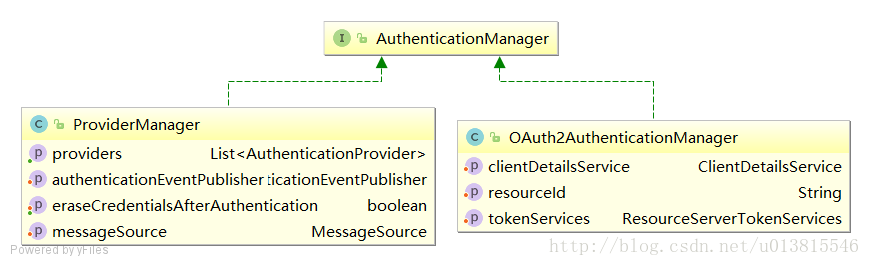 (opens new window)图 1 新的 AuthenticationManager 实现类 OAuth2AuthenticationManager
回顾我们第一篇文章的配置,压根没有出现过这个 OAuth2AuthenticationManager,并且它脱离了我们熟悉的认证流程(第二篇文章中的认证管理器 UML 图是一张经典的 spring security 结构类图),它直接重写了容器的顶级身份认证接口,内部维护了一个 ClientDetailService 和 ResourceServerTokenServices,这两个核心类在 从零开始的 Spring Security Oauth2(二) (opens new window)有分析过。在 ResourceServerSecurityConfigurer 的小节中我们已经知晓了它是如何被框架自动配置的,这里要强调的是 OAuth2AuthenticationManager 是密切与 token 认证相关的,而不是与获取 token 密切相关的。
其判别身份的关键代码如下:
public Authentication authenticate(Authentication authentication) throws AuthenticationException {

    ...
    String token = (String) authentication.getPrincipal();
    //最终还是借助tokenServices根据token加载身份信息
    OAuth2Authentication auth = tokenServices.loadAuthentication(token);
    ...

    checkClientDetails(auth);

    if (authentication.getDetails() instanceof OAuth2AuthenticationDetails) {
        OAuth2AuthenticationDetails details = (OAuth2AuthenticationDetails) authentication.getDetails();
        ...
    }
    auth.setDetails(authentication.getDetails());
    auth.setAuthenticated(true);
    return auth;

}
说到 tokenServices 这个密切与 token 相关的接口,这里要强调下,避免产生误解。tokenServices 分为两类,一个是用在 AuthenticationServer 端,第二篇文章中介绍的
public interface AuthorizationServerTokenServices {
    //创建token
    OAuth2AccessToken createAccessToken(OAuth2Authentication authentication) throws AuthenticationException;
    //刷新token
    OAuth2AccessToken refreshAccessToken(String refreshToken, TokenRequest tokenRequest)
            throws AuthenticationException;
    //获取token
    OAuth2AccessToken getAccessToken(OAuth2Authentication authentication);
}
而在 ResourceServer 端有自己的 tokenServices 接口:
public interface ResourceServerTokenServices {

    //根据accessToken加载客户端信息
    OAuth2Authentication loadAuthentication(String accessToken) throws AuthenticationException, InvalidTokenException;

    //根据accessToken获取完整的访问令牌详细信息。
    OAuth2AccessToken readAccessToken(String accessToken);

}
具体内部如何加载,和 AuthorizationServer 大同小异,只是从 tokenStore 中取出相应身份的流程有点区别,不再详细看实现类了。
# TokenExtractor(了解)
这个接口只有一个实现类,而且代码非常简单
public class BearerTokenExtractor implements TokenExtractor {

    private final static Log logger = LogFactory.getLog(BearerTokenExtractor.class);

    @Override
    public Authentication extract(HttpServletRequest request) {
        String tokenValue = extractToken(request);
        if (tokenValue != null) {
            PreAuthenticatedAuthenticationToken authentication = new PreAuthenticatedAuthenticationToken(tokenValue, "");
            return authentication;
        }
        return null;
    }

    protected String extractToken(HttpServletRequest request) {
        // first check the header...
        String token = extractHeaderToken(request);

        // bearer type allows a request parameter as well
        if (token == null) {
            ...
            //从requestParameter中获取token
        }

        return token;
    }

    /**
     * Extract the OAuth bearer token from a header.
     */
    protected String extractHeaderToken(HttpServletRequest request) {
        Enumeration<String> headers = request.getHeaders("Authorization");
        while (headers.hasMoreElements()) { // typically there is only one (most servers enforce that)
            ...
            //从Header中获取token
        }
        return null;
    }

}
它的作用在于分离出请求中包含的 token。也启示了我们可以使用多种方式携带 token。
1 在 Header 中携带
http://localhost:8080/order/1
Header: Authentication:Bearer f732723d-af7f-41bb-bd06-2636ab2be135
2 拼接在 url 中作为 requestParam
http://localhost:8080/order/1?access_token=f732723d-af7f-41bb-bd06-2636ab2be135
3 在 form 表单中携带
http://localhost:8080/order/1
form param: access_token=f732723d-af7f-41bb-bd06-2636ab2be135
# 异常处理
OAuth2 在资源服务器端的异常处理不算特别完善,但基本够用,如果想要重写异常机制,可以直接替换掉相关的 Handler,如权限相关的 AccessDeniedHandler。具体的配置应该在@EnableResourceServer 中被覆盖,这是适配器+配置器的好处。
# 结语
到这儿,Spring Security OAuth2 的整个内部流程就算是分析结束了。本系列的文章只能算是揭示一个大概的流程,重点还是介绍相关设计+接口,想要了解更多的细节,需要自己去翻看源码,研究各个实现类。在分析源码过程中总结出的一点经验,与君共勉:
- 先掌握宏观,如研究 UML 类图,搞清楚关联
- 分析顶级接口,设计是面向接口的,不重要的部分,具体实现类甚至都可以忽略
- 学会对比,如 ResourceServer 和 AuthenticationServer 是一种对称的设计,整个框架内部的类非常多,但分门别类的记忆,会加深记忆。如 ResourceServerTokenServices ,AuthenticationServerTokenServices 就一定是作用相关,但所属领域不同的两个接口
- 熟悉设计模式,spring 中涉及了大量的设计模式,在框架的设计中也是遵循着设计模式的规范,如以 Adapter 结尾,便是运用了适配器模式;以 Factory 结尾,便是运用了适配器模式;Template 结尾,便是运用了模板方法模式;Builder 结尾,便是运用了建造者模式…
- 一点自己的理解:对源码的理解和灵感,这一切都建立自身的编码经验之上,自己遵循规范便能更好的理解别人同样遵守规范的代码。相对的,阅读好的源码,也能帮助我们自身提升编码规范。